Free and open source · MIT

The Git client that keeps up.

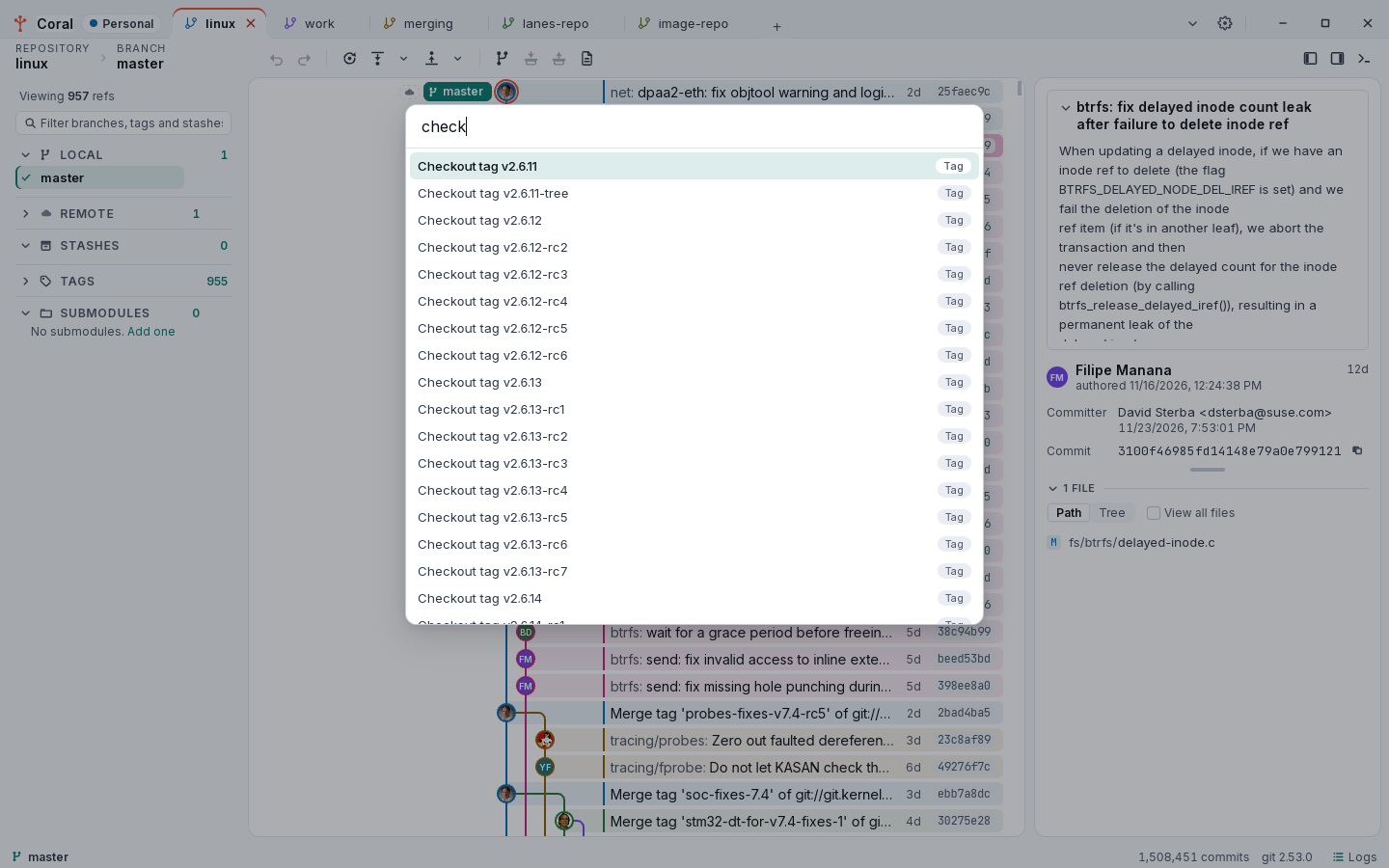
Coral lays out every one of the Linux kernel's 1.48 million commits in about 6.2 seconds, holds them in under 300 MB, and sits at zero CPU when you stop. Rust engine, the system's own web view, no Electron.

Linux, macOS and Windows · x86-64 and Arm

Coral showing the Linux kernel's commit graph, with branches in their own colours and a commit's message open on the right
Features

All of Git, in one window you can see through.

Every branch in its own lane, every change one click from staged, and an undo for the moments Git usually punishes.

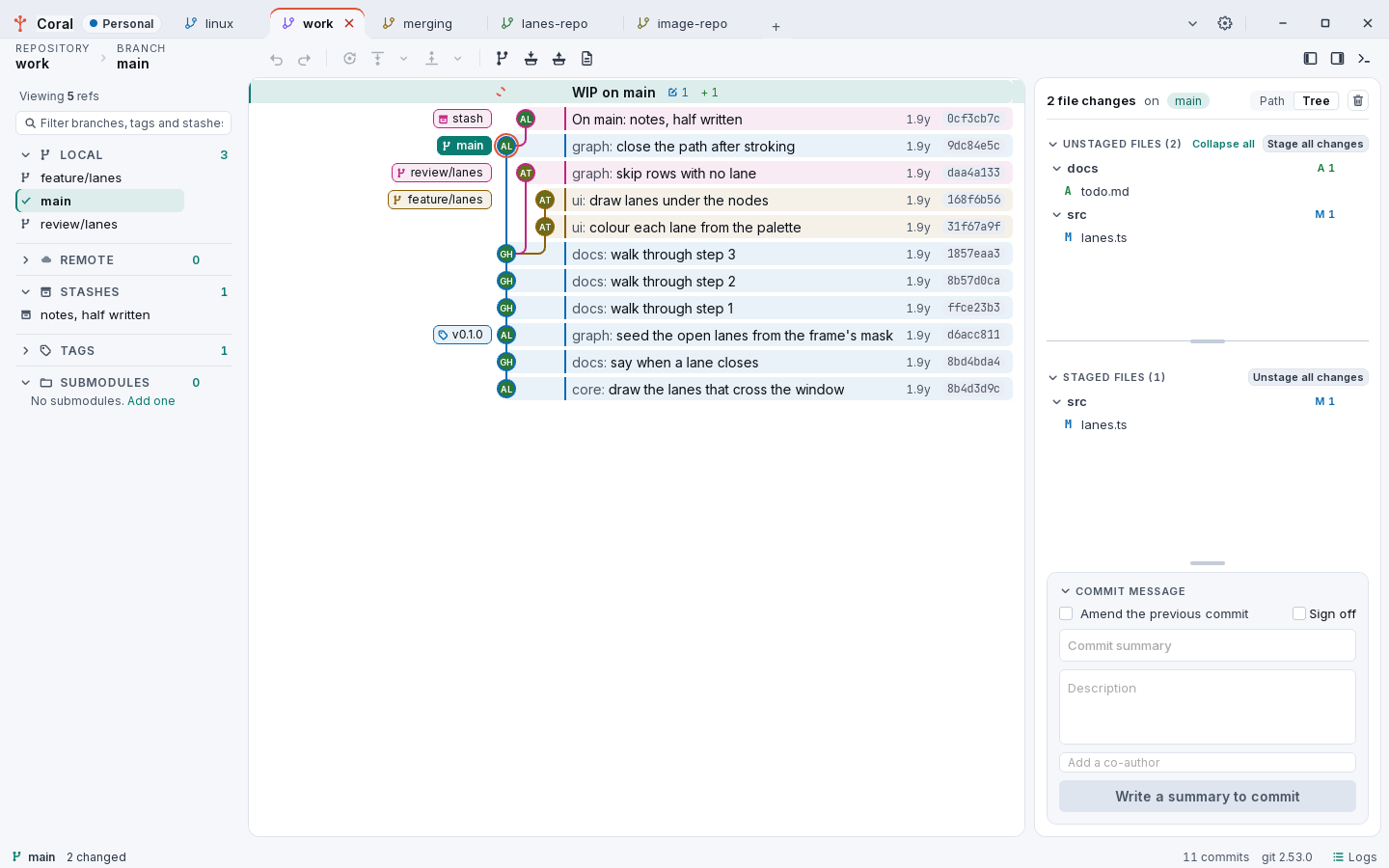
A graph that holds a million commits.

The graph is drawn on a canvas from a compact store of rows, so the kernel's whole history scrolls as smoothly as a repository of ten commits.

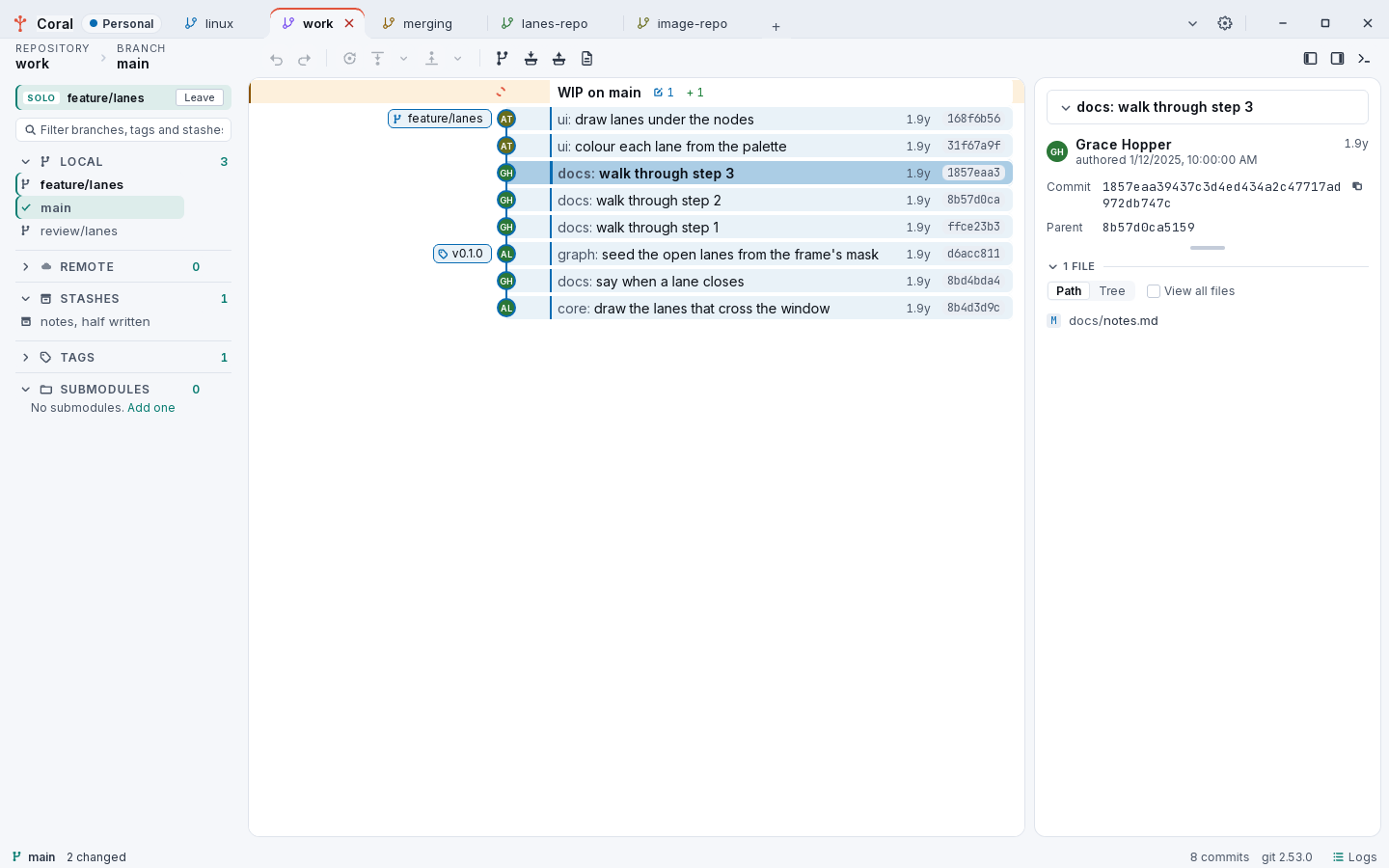
  • Solo a branch or hide one; Coral remembers it per repository
  • Find any commit by message, author, path or id
  • Authors' pictures from Gravatar or GitHub, or their initials
  • Drag one branch label onto another to merge, push or pull
One branch soloed: the graph walks only its history

Find what the code said, not only the message.

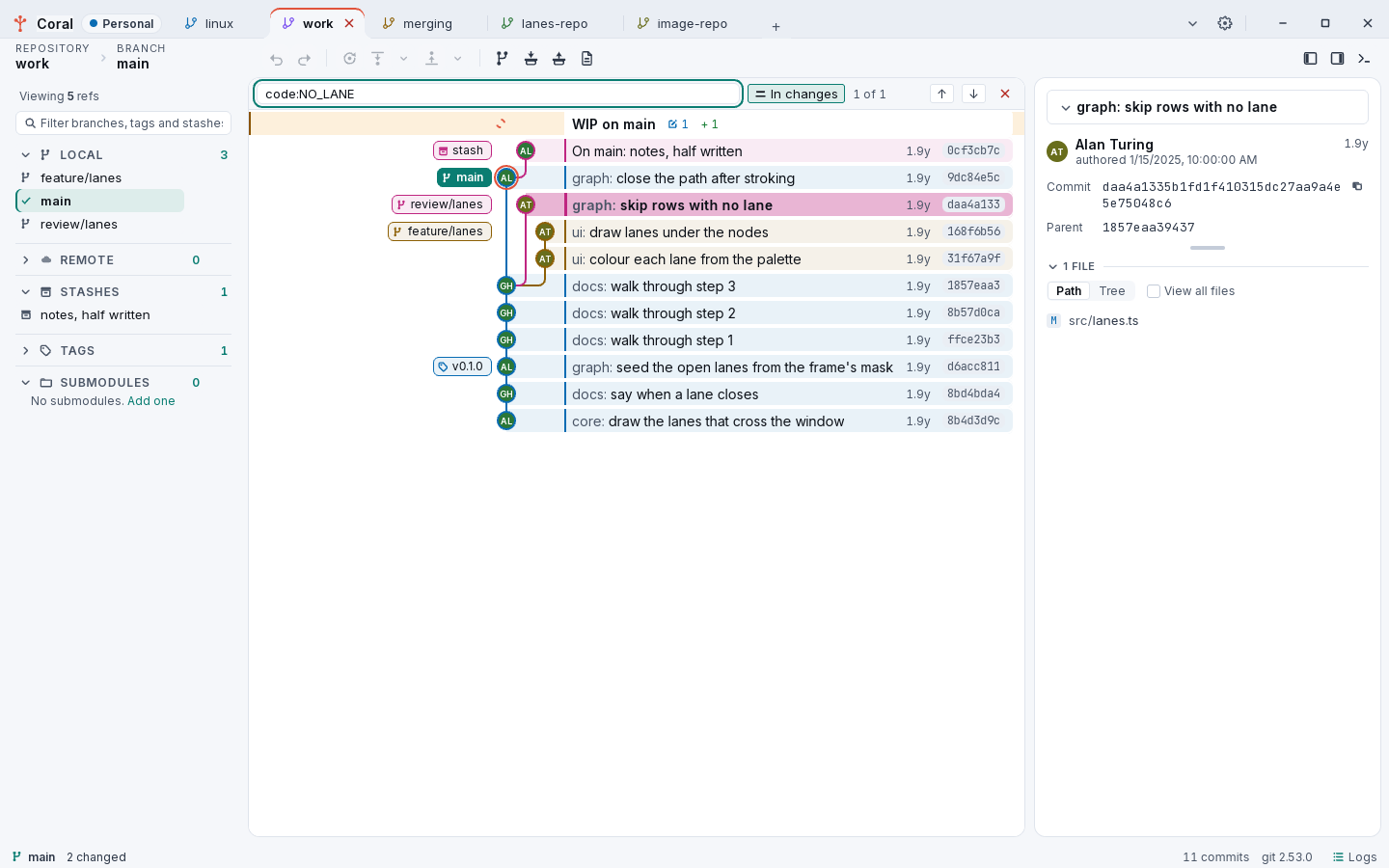
The find box searches what each commit changed as well as what it says about itself. code:render_row finds the commits that added or removed it, whatever their messages claim, and after: and before: bound it by date.

  • code:"/fn [a-z_]+_row/" for a regular expression
  • Dates as 2026-05-01 or 2.weeks
  • A new search stops the one still running, so typing stays quick on the kernel
The find box searching for the commit that added NO_LANE, landing on it

Find the commit that broke it.

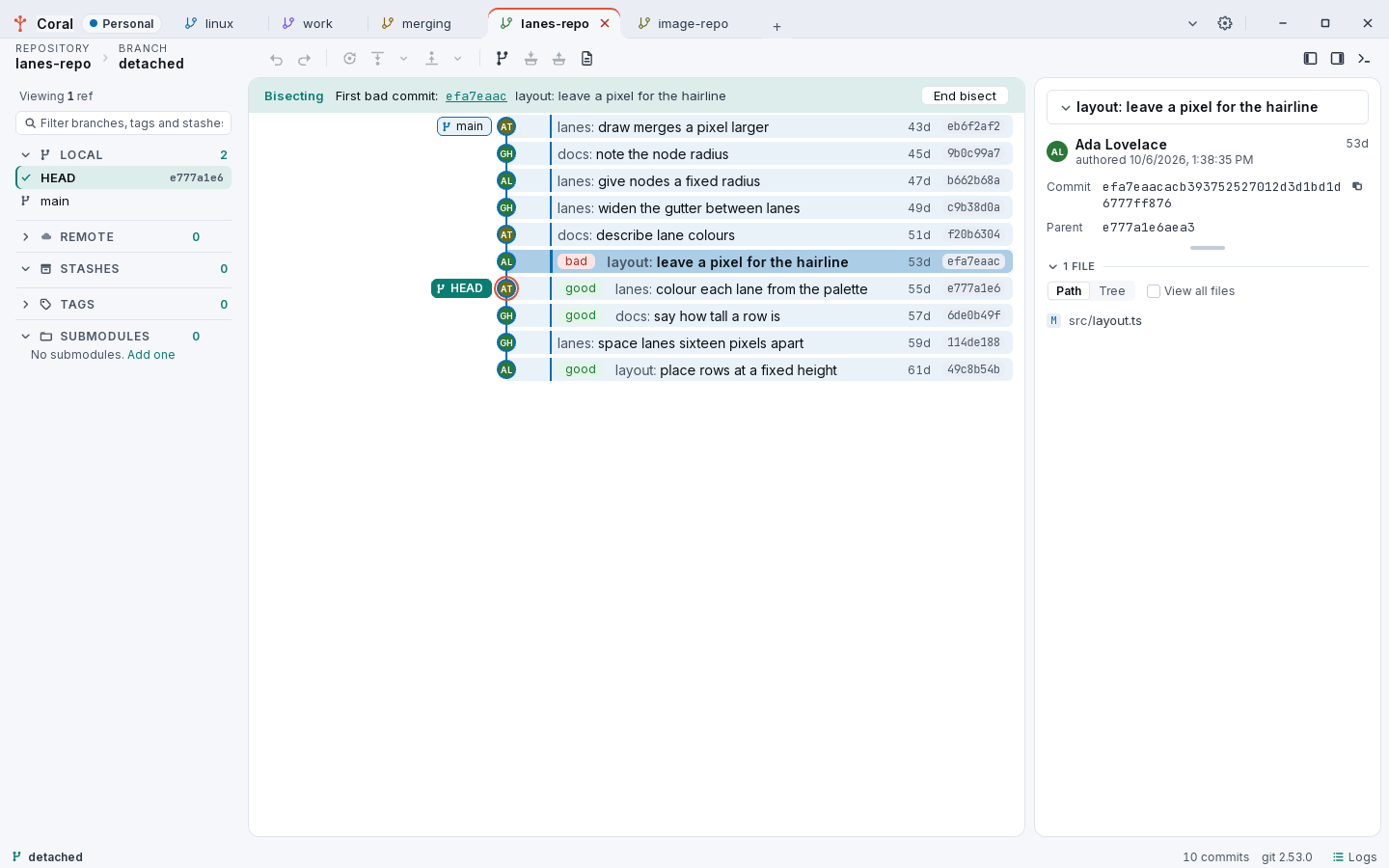
Mark a commit bad and one that was good, and Coral checks out the one halfway between. Say whether it is good or bad, or skip it, and it halves again until one commit is left, named at the top of the list.

  • Every verdict marked on its row
  • Picks up a bisect started in the terminal, in its own terms
  • End it to go back to where you were
A finished bisect: the first bad commit named above the list, with good and bad marked on the commits judged

Interactive rebase, planned in a list.

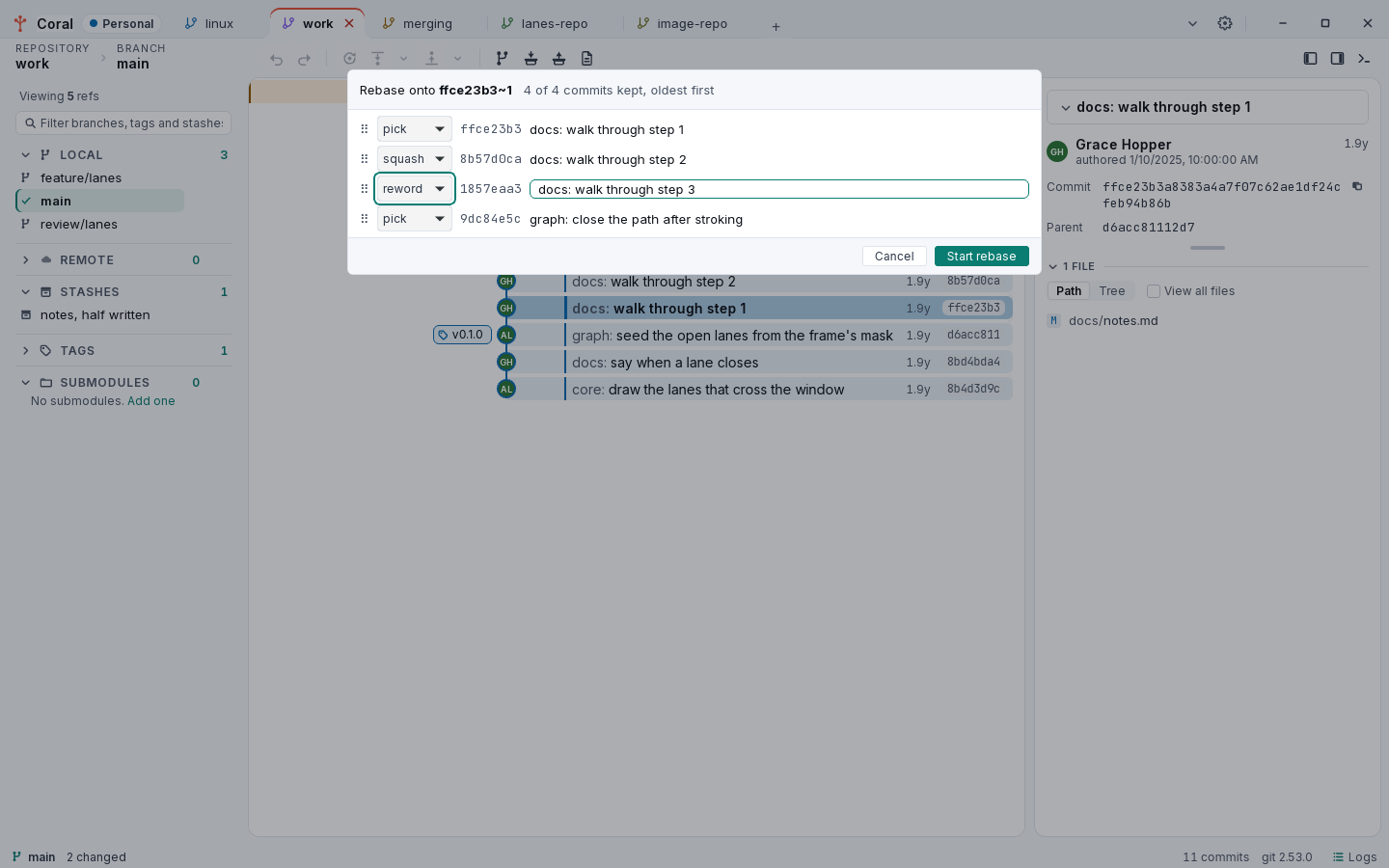
Pick, reword, edit, squash, fixup, drop and reorder from one list, then start when it is right. If Git stops part-way, continue, skip or abort from the same place.

  • Merge, rebase, cherry-pick, revert and reset
  • Force pushes are always --force-with-lease
  • Patches out and in
The interactive rebase list with an action per commit

Stage the line you mean.

Read the diff inline or side by side, with the changed words marked, then stage a file, a hunk or a single line.

  • Commit, amend and discard
  • Lists and message box that fold and resize, and stay as you left them
  • Commit signing, per repository
  • Blame and file history for any line
Staging individual lines from a diff

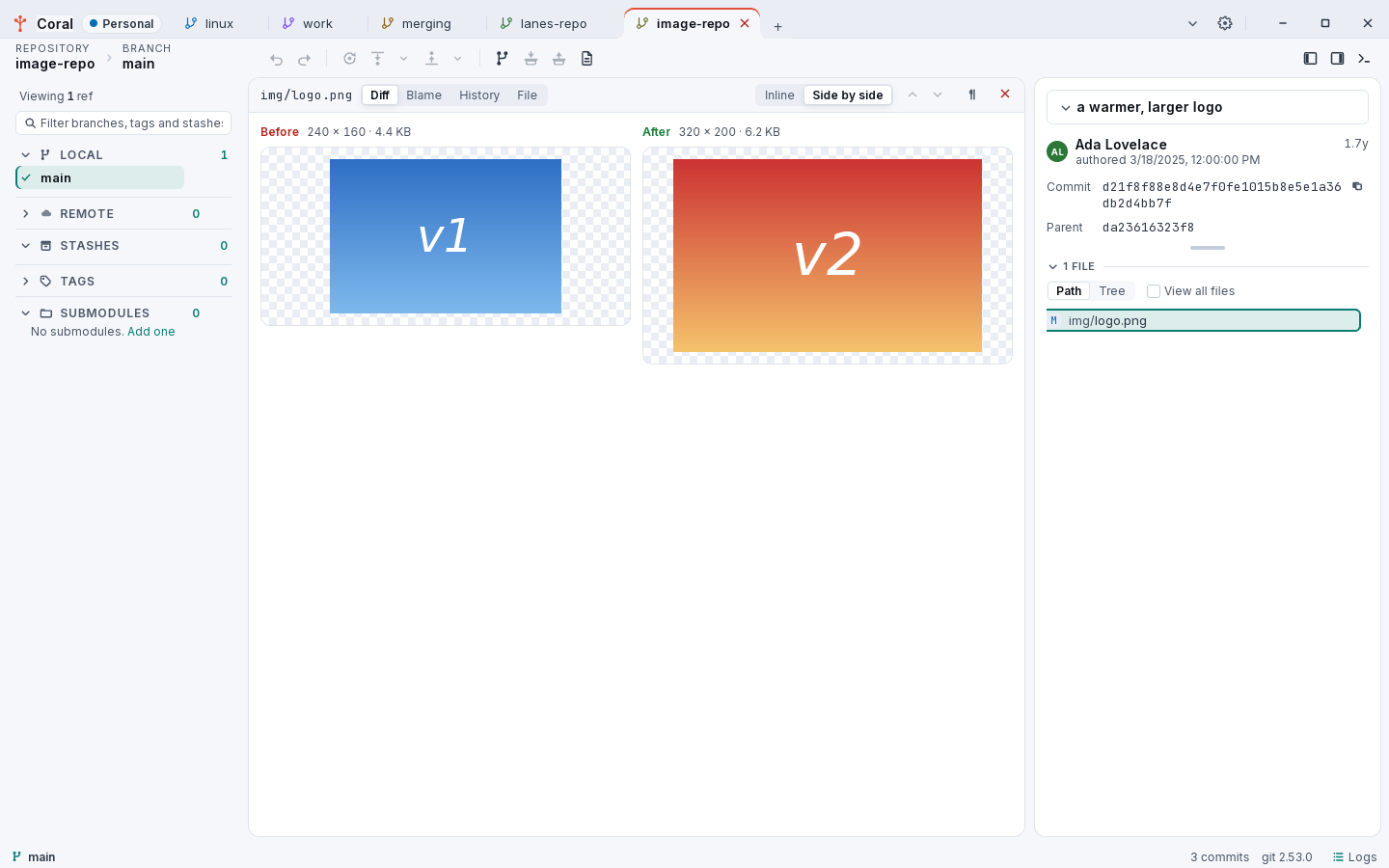
Images, before and after.

A changed image is drawn rather than called binary: the two versions side by side, each with its size in pixels and bytes, on a checkerboard so transparency shows.

  • PNG, JPEG, GIF, WebP, BMP, ICO and AVIF
  • In a commit, a comparison, or what you are about to commit
A logo changed in a commit, the old one beside the new with their sizes

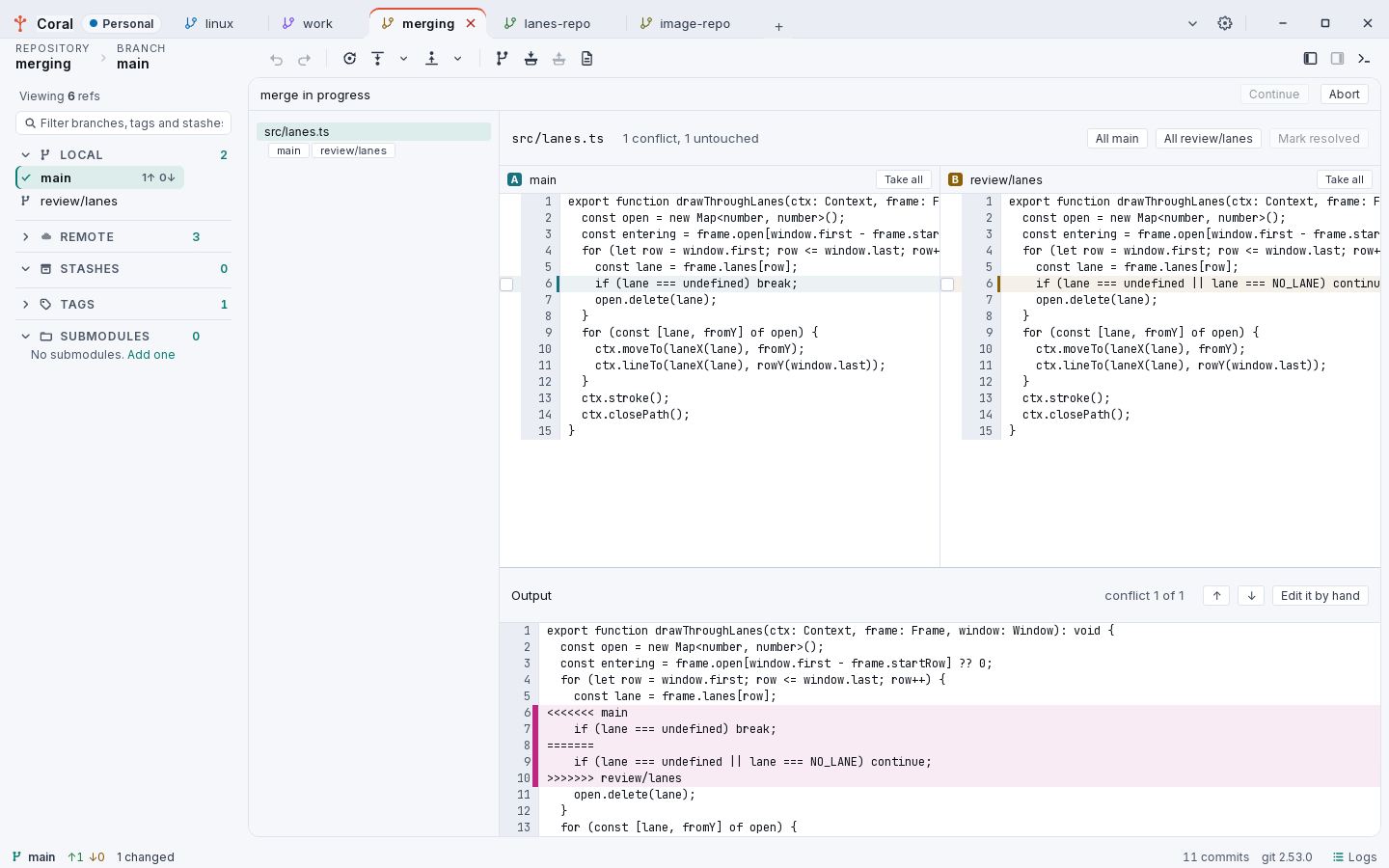
Conflicts, with both sides named.

A three-pane merge tool shows your side and theirs, each named after the branch it came from, with the result underneath. Take a line, a block or a whole side.

  • Continue or abort a merge, rebase or cherry-pick at any step
  • Large and LFS files handled without loading them whole
  • Undo and redo for every operation
The three-pane conflict tool

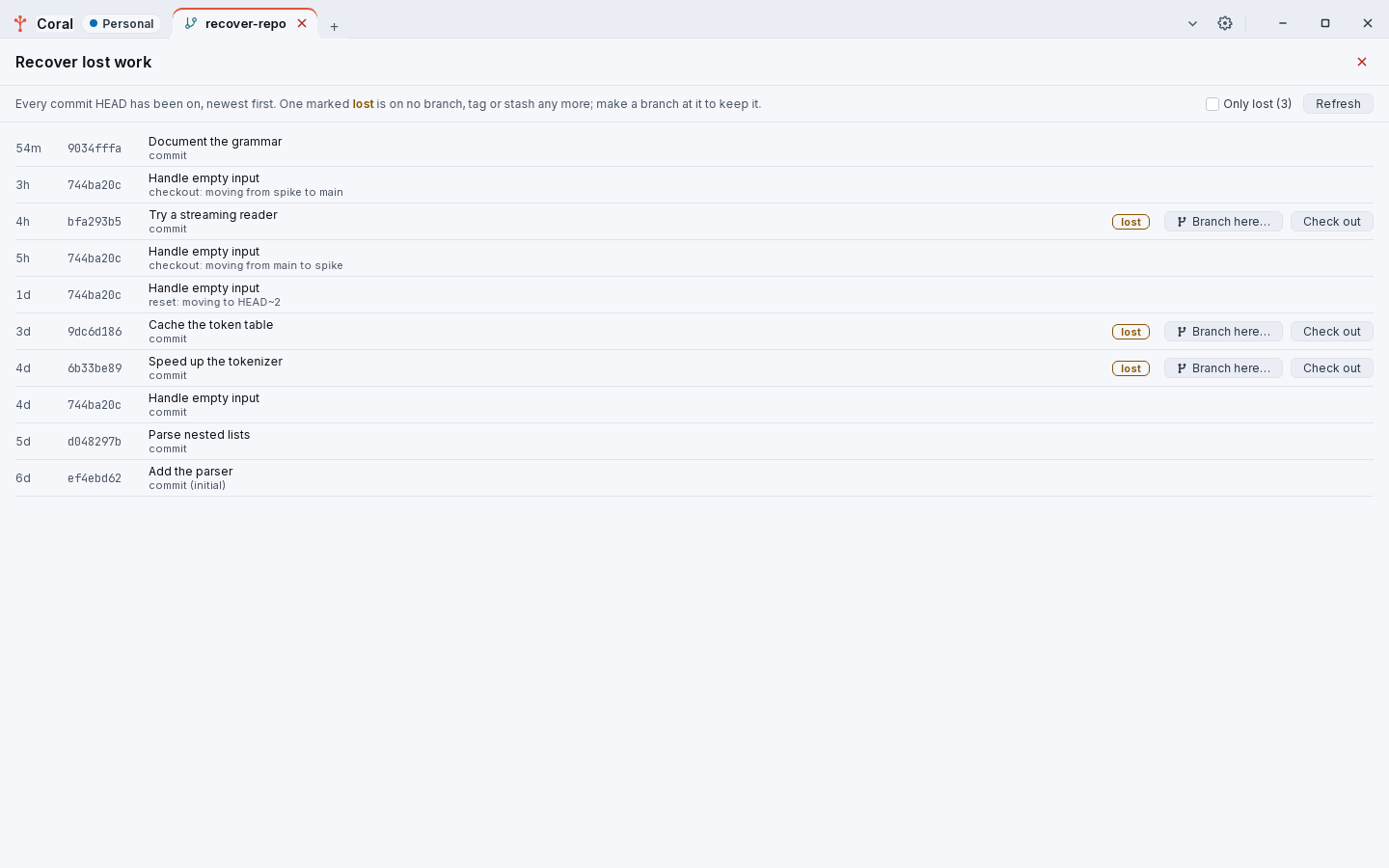
Lost work, found again.

A hard reset, a rebase or a deleted branch leaves commits nothing points at. Coral lists every commit HEAD has been on, marks the ones that are lost, and makes a branch at one in a click.

  • Read from git's own reflog, so it finds work lost in the terminal too
  • Check a commit out first to see what is in it
The recovery sheet listing where HEAD has been, three commits marked lost

Keys at your fingertips.

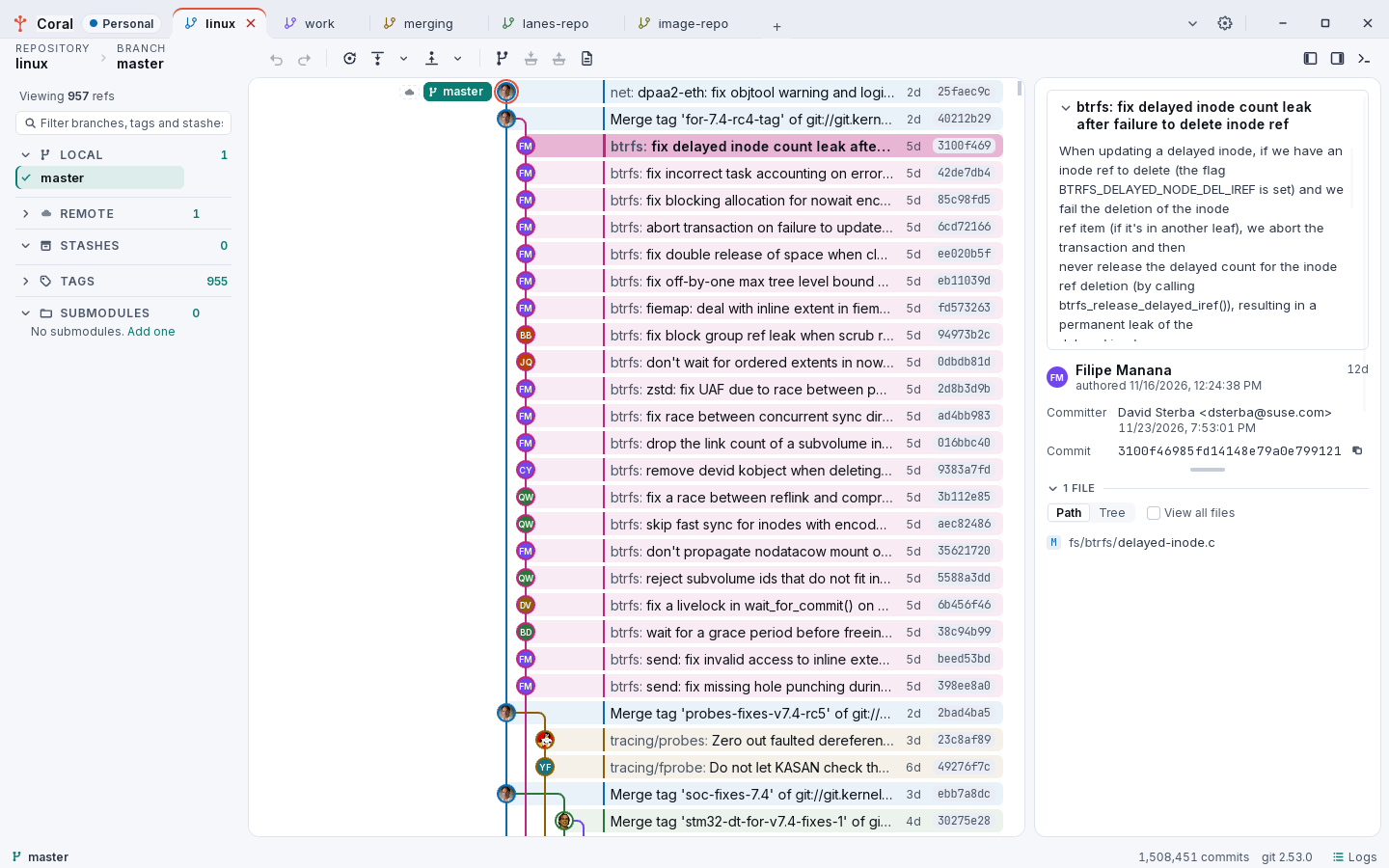
A command palette on Ctrl P reaches every action, and a terminal opens on Ctrl ` in the repository you are looking at. The shortcuts are GitKraken's, so there is nothing to relearn, and Ctrl / lists them all.

The command palette open over the graph

GitHub and GitLab

Pull and merge requests in the sidebar, checked out locally from a right-click, forks included, and a new one opened from the branch you are on. Enterprise and self-hosted too.

Checks at a glance

Each open pull or merge request is marked passing, failing or running, from GitHub's checks or GitLab's pipeline. One click opens the check that failed.

Reviews from the sidebar

Read a pull or merge request's review, comments on lines included, then comment, approve or ask for changes without leaving the window.

Updates itself

Install a new release from About, checked against Coral's signing key before anything is replaced. It only looks when you ask, or at launch if you turn that on.

Profiles

Work and personal, each with its own tabs, identity, ssh key and signing, so a commit never goes out under the wrong name.

Tokens in the keyring

Host tokens live in the operating system's keyring, and Coral answers git's credential requests itself.

Worktrees, stashes, submodules

Stash one file, or only what is staged. Plus shallow and blobless clones and SHA-256 repositories, and a window that refreshes as files change on disk.

LFS, tracked and locked

Put a file, or every file of its kind, into LFS from its menu. Lock one before you edit it, and see the files a teammate has locked.

Signatures checked

A signed commit says whose GPG or SSH signature it carries and whether it holds, without holding up the rest of its details.

Several commits at once

Ctrl-click or Shift-click commits, then cherry pick them all, oldest first, or revert them all, newest first.

Ignore, or stop tracking

Ignore a file, its kind or its folder from its menu. Stop tracking a file committed by mistake, and it stays on disk.

Notes and templates

Leave a note beside a commit without changing its id, and start every message from the repository's commit template.

Light and dark

Two themes drawn from the same set of colour tokens, so dark is designed rather than inverted. Switch from the settings menu or the palette.

Tabs that stay

One tab per repository, grouped and coloured the way you like, restored on the next launch.

A command line, too

Fifty-four commands over the same engine as the window, each with a --json output for scripts.
Performance

Measured on the Linux kernel.

1,481,528 commits, 944 tags and a 96,000-file working tree: the repository that makes most clients wait. Coral's engine is Rust, its window is the system's own web view, and git is the one already on your computer.

2.7 sfrom launch to a still window, the first screen already in its final order
283 MBof memory with the whole kernel graph loaded
0%CPU while the window sits idle
90 msto check the status of all 96,025 files

Time until the window is still

Seconds from launch to the last repaint. Coral orders the whole history in the background; the others load it as you scroll.

  • Sublime Merge1.2 s
  • GitHub Desktop1.3 s
  • Coral2.7 s
  • GitKraken5.4 s

Memory with the kernel open

MB, all of the client's processes together. Lower is better.

  • Coral283 MB
  • GitHub Desktop283 MB
  • Sublime Merge1,534 MB
  • GitKraken1,727 MB

Idle CPU

Percent of one core, thirty seconds with no input. Lower is better.

  • Coral0.0%
  • Sublime Merge0.0%
  • GitHub Desktop0.3%
  • GitKraken3.4%

Installed size

MB on disk. Coral uses the system's web view rather than bundling one.

  • Sublime Merge27 MB
  • Coral40 MB
  • GitHub Desktop443 MB
  • GitKraken699 MB

How this was measured. Measured on 2026-10-21 on an Intel Core Ultra 9 285H, 16 threads with 64 GB of memory, running Ubuntu 24.04.5, Linux 6.17 and git 2.43.0. Each client opened the same local clone of the Linux kernel, alone on a nested X display, from a fresh profile, three times; the medians are shown. Memory is the proportional set size of all the client's processes twenty seconds after the window stopped changing. Status is the coral status command, warm, process start included.

Coral 1.2.6. Its time to still is from 2026-10-22, measured beside 1.2.5 on the same machine the same day: 2.7 s against 5.8 s, at 308 MB against 318 MB of memory and no CPU at idle for either. The first screen of the kernel is now drawn in its final order and does not change when the full history has been ordered. The other clients' figures, and Coral's memory, are from 2026-10-21, when every client was measured together; on the 22nd 1.2.4 measured the same as 1.2.2 to the tenth of a second, so the conditions held.

The script and every run's numbers are in the repository: tests/clients. Fork and Sourcetree have no Linux build and SmartGit was left out because its setup requires agreeing to its licence, so none of them were measured.

Compare

How Coral sits beside the others.

Facts that can be checked: what each one is built on, what it costs, and the numbers above.

Coral GitKraken Sublime Merge GitHub Desktop
Built withRust, and the system's own web viewElectronC++, its own native interfaceElectron
LicenceMIT, open sourceProprietaryProprietaryMIT, open source
PriceFreeFree for public repositories; paid for private onesPaid licence, with a free evaluationFree
On LinuxOfficial builds, x86-64 and ArmOfficial buildsOfficial buildsCommunity buildshiftkey/desktop
Commit graphYesYesYesNoa list of commits
Time until the window is still2.7 s5.4 s1.2 s1.3 s
Memory, kernel open283 MB1,727 MB1,534 MB283 MB
Idle CPU0.0%3.4%0.0%0.3%
Installed size40 MB699 MB27 MB443 MB
Version measured1.2.2time to still: 1.2.612.4.1build 21323.4.13-linux1 (community Linux build)
Download

Try it on your own repository.

Free, with no account and no card. Builds come from the project's own release workflow on GitHub.

Linux

Debian 12, Ubuntu 22.04, RHEL 9 or newer. Git 2.40 or newer.

macOS

Git 2.40 or newer.

Windows

Windows 10 or 11. Git 2.40 or newer.